Published on:
Last updated on:

It's 6:40 on a Thursday and the film is done. Allegedly.
Meera runs delivery at a six-person content agency. The project is a 45-second brand film. Round four. The client said "almost there" that morning, which in her experience means either two minutes of work or two more days.
Her phone buzzes.
Client, 6:42 PM: Almost there! Just fix the logo thing we discussed.
Meera: Which logo thing?
Client: The one from the call. Ravi mentioned it.
She scrolls up through the WhatsApp thread. Nothing about a logo. She checks her email. She checks the comments on the Google doc file. She checks the Slack channel where, at some point in month two, the client's marketing lead and her editor both ended up talking directly without her.
Client, 6:51 PM: Also my boss finally watched it and had a few notes — sending screenshots.
v2. Her boss watched v2. Two versions ago. The screenshots arrive with red circles drawn on them and no timestamps. One of them just says "make the cut here punchier."
Which cut.
At 7:04 a voice note comes through. It is four minutes and eleven seconds long. Her editor logged off at six.
The film shipped Monday instead of Friday. Nobody billed for round five. And the client genuinely believes they were being easy to work with — because from where they're sitting, they were. They watched a video and said what they thought.
Here's the part that matters: Meera wasn't working without a video review tool. The agency pays for one. The problem was that only three steps of an eleven-step process ever happened inside it.
That gap is what this article is about.
Why "best video review software" is the wrong question
Most comparison articles rank tools on player quality, annotation types, and price per seat. Those things matter, but they're not where agency projects actually fail.
A real client approval cycle has eleven steps:
Brief lands
Project gets created
Priority and deadline set
Editor assigned
Cut uploaded
Internal review
Internal notes actioned
Client link shared
Client comments come in
Fixes made, new version delivered
Final files handed over, invoice paid
Now map where those live in a typical agency. Steps 1–4 are in Notion, Asana, or a spreadsheet. Step 6 is in Slack. Steps 8–9 are in your review tool. Step 10 is half in the review tool and half in WhatsApp. Step 11 is in WeTransfer and an invoice that will be paid, on current industry averages, somewhere between three weeks and three months from now.
Every handoff between two tools is a place where a note goes missing. You don't lose feedback inside Frame.io. You lose it in the gap between Frame.io and everything else.
Industry research puts scope creep on roughly half of all creative projects, and the usual diagnosis is a weak statement of work. That's part of it. But the mechanical cause is simpler: when feedback lives in five places, nobody can prove what was and wasn't asked for, so every argument about scope defaults to the client's memory.
What agencies actually complain about (and what it tells you)
Read enough editor and agency discussion threads and the same six complaints surface. Not one of them is "the video player isn't good enough."
1. Clients won't log in
This is the single most under-priced problem in the category. Adobe's own community forums are full of people who couldn't get into Frame.io — account conflicts between an old free login and a Creative Cloud ID, password loops, review sessions abandoned after an hour of troubleshooting. Some of those threads have thousands of views, which tells you how many people hit the same wall silently.
Now consider that your client is a marketing manager who does this once a month. If the review link asks them to create an account, one of two things happens: they don't review it, or they review it somewhere else — usually by replying to your email with a paragraph of notes.
Every account wall is a place where feedback escapes your system.
2. Nobody knows when feedback is finished
A recurring piece of advice in agency reviews of existing tools is that whoever gives notes should also email a summary saying they're done, so the editor doesn't start work on a half-finished list. That's a workaround for a missing state. If your tool can't signal "this round is complete," your editor either starts too early and redoes work, or waits and loses a day.
3. Internal notes and client notes live in different universes
Your editor's rough pass gets discussed in Slack. The client's notes are in the review tool. The producer is manually reconciling two lists and hoping nothing from the internal round got silently dropped. Worse, there's a permanent low-grade fear that someone pastes the internal thread into the wrong window.
4. Approval chains are slower than anyone budgets for
A common pattern: first draft lands day 2, marketing sees it day 3, product weighs in day 4, legal has a note day 5, and consolidated feedback arrives day 7. The revision is your problem. The five days of internal client politics are not — but they eat your timeline anyway. Tools that can't show where a round is stuck make this invisible until it's too late.
5. Storage-based pricing punishes you for doing video
Video files are large. Pricing that scales with gigabytes means you're penalized for uploading a ProRes master or keeping past versions around. Agencies respond by deleting old versions, which is exactly the thing you need when a client disputes a change.
6. Vertical video is being approved on the wrong screen
This one is newer and it's costing agencies real rework. Instagram Reels overlays roughly 500px of UI at the bottom of a 1080×1920 frame; YouTube Shorts covers around 320px; TikTok's UI is heavier still, and the right third of the frame is effectively unusable for text. The practical universal safe zone is about 900×1400 centered.
None of that is visible on a desktop review player. So the client approves the cut on a laptop, you deliver, they post it, and the caption bar sits directly on top of the CTA. That's a re-export and an awkward email — after sign-off.
The six things that actually matter in a video review tool
If you're evaluating options, these are the criteria that predict whether a tool will survive contact with real clients.
Zero-friction reviewer access. If a client has to make an account, you will receive feedback over WhatsApp instead.
Separated internal and client feedback. Your editor's working notes should sit on the same timeline as client notes but never be visible to the brand.
Version discipline. Clients must not be able to comment on superseded cuts. If they can, you will get round-2 notes during round 4.
Feedback formats that match how clients think. Some people type. Some draw. Some send a reference image. Some just want to talk. Force them into text only and you'll get "make it punchier."
Project context, not just a player. Owner, stage, priority, due date. If this lives in another tool, your review tool is a viewer, not a workflow.
Mobile and platform-accurate preview. Half your reviewers open the link on a phone. Half your deliverables are vertical. Both facts should be reflected in what the client sees.
The landscape: what each tool is genuinely good at
No tool on this list is bad. They're built for different shapes of problem.
Frame.io — The category standard, and deservedly so. Deep Premiere and After Effects integration, camera-to-cloud, excellent player, strong permissions. Best-in-class if you live inside Adobe and your project management genuinely happens elsewhere. Watch for: Adobe ID account friction for external reviewers, and pricing that scales awkwardly for small teams.
Vimeo Review — Sensible if you already pay for Vimeo hosting. Review is a feature attached to a hosting product, not the product itself, which shows in workflow depth.
Filestage — Strong on multi-stakeholder approval chains and non-video assets, with real approval states. Built more for brand-side marketing teams managing many reviewers than for post teams managing many versions. Heavier to set up.
Wipster / ReviewStudio — Clean, capable, well-liked reviewers. Same structural boundary: they begin at the upload and end at the comment.
Dropbox Replay — Convenient if your media already lives in Dropbox. Thin on project structure.
Google Drive + WhatsApp — Say it out loud, because it's what a majority of small agencies actually use. It's free, and it is costing you roughly one unbilled revision round per project.
Every one of these handles steps 5, 8, and 9 well. The question is what's handling 1 through 4, and 10, and 11.
How Postjamm handles the full approval loop
Postjamm was built around the eleven steps rather than around the player. Here's the same brand film, run through it.
Before there's a video
The project is created first. Folders by client or by campaign. Priority, due date, and stage set on the project itself. Editor assigned. The brief attaches here.
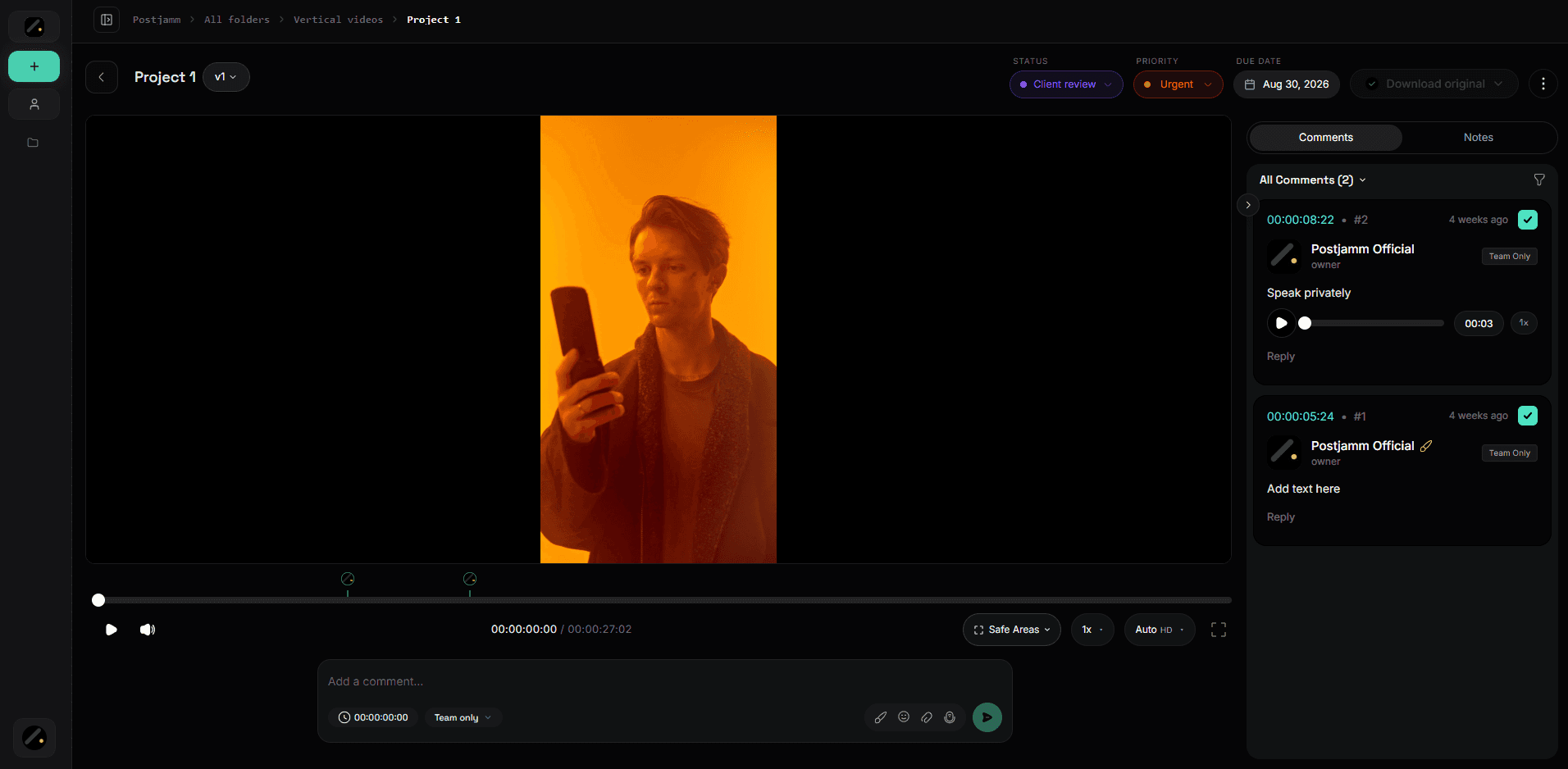
This is the step almost no review tool has, and it's why agencies end up running Notion and Frame.io in parallel. In Postjamm the project exists before the first frame does — so when the client asks "where is the Nykaa film," there's one place to look.
Upload and internal review
The cut goes up. The team reviews it using internal comments — same timeline, same interface, visible only to your side. Your senior editor can write "the audio duck at 0:12 is rough, fix before this goes out" without any risk of the client reading it.
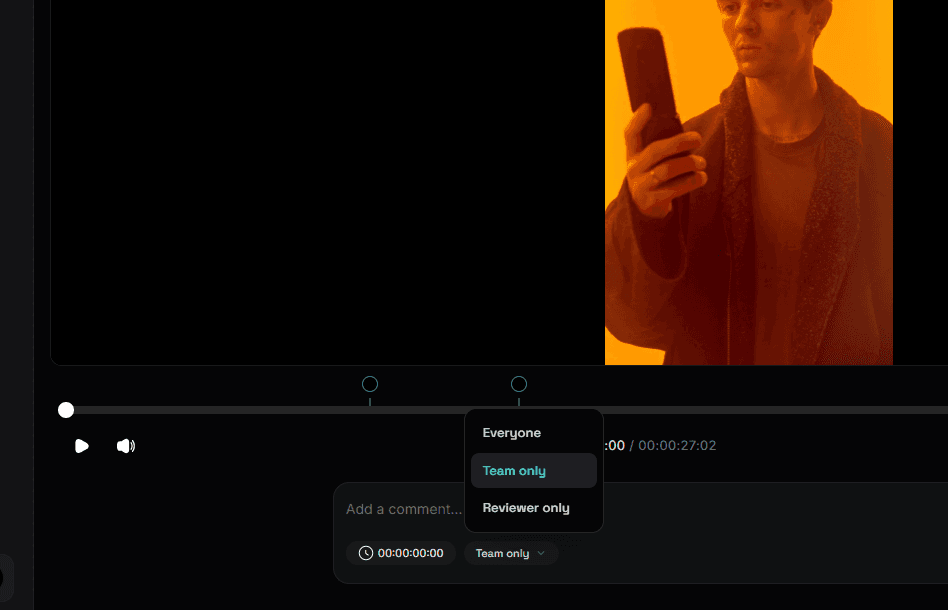
No parallel Slack thread. No second list to reconcile. And critically: no chance of sending the wrong link.
The share — and the moment most tools lose the client
The reviewer opens the link, types their name, and starts commenting. No account. No password reset email. No "can you just WhatsApp it to me."
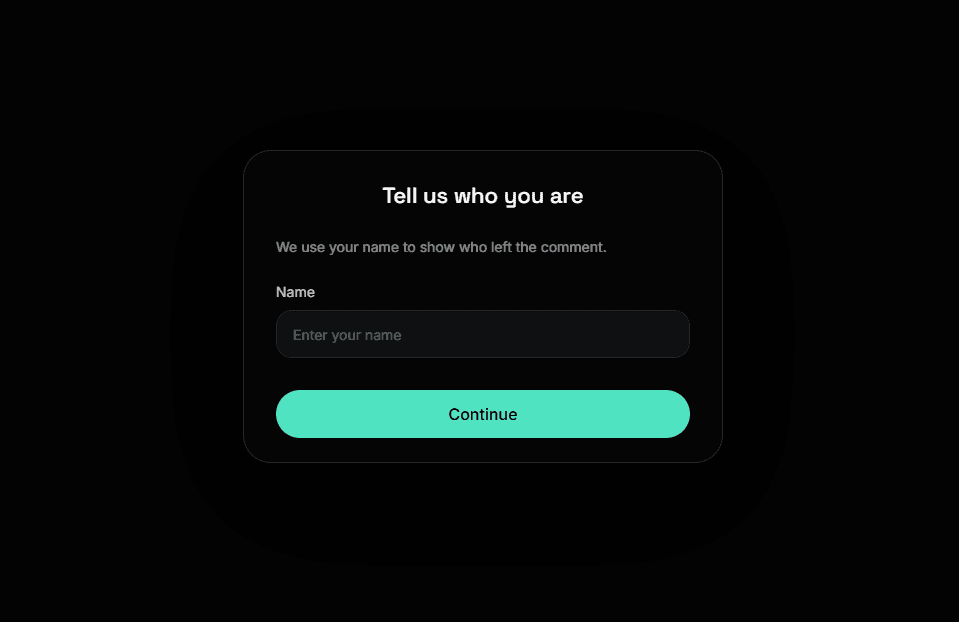
This is a workflow decision, not a convenience feature. Given how much feedback leaks out of review tools at the login screen, removing the login is one of the highest-leverage things a review tool can do.
How clients actually leave notes
Four formats: text, annotation, image upload, and voice note.

The difference is concrete. "Make it punchier" is not a task. "Make it punchier" drawn on frame 00:14, with a reference screenshot attached, is a task an editor can execute without a phone call.
The voice note matters more than it sounds. The client who was going to call you anyway now leaves a 40-second note attached to the exact second they're talking about — and it's on the record, timestamped, instead of in a conversation nobody wrote down.
Mobile and social safe areas
The review link is mobile-optimized, because that's where clients actually watch. For vertical cuts, the reviewer can preview the video with Instagram, YouTube, and TikTok safe areas overlaid.
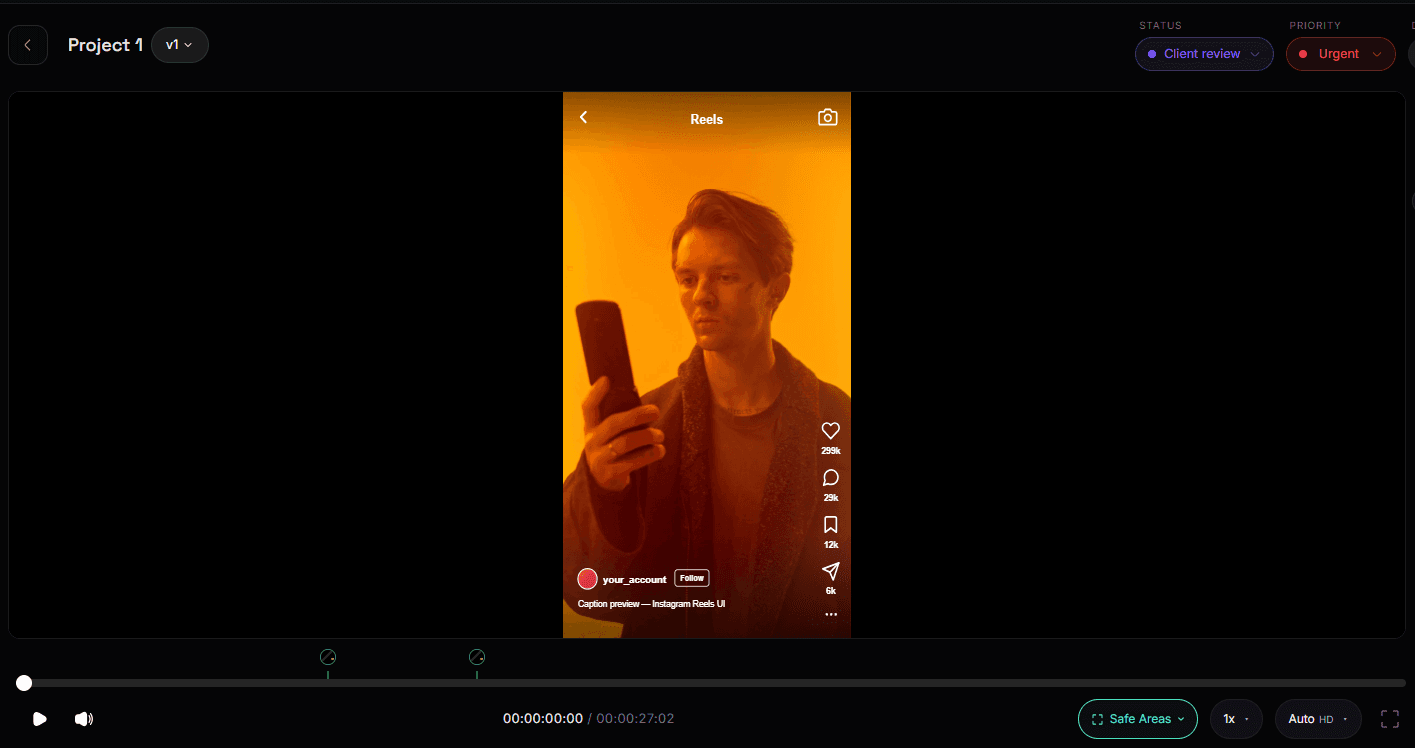
That means the "your caption is going to cover our logo" conversation happens during review, on the client's phone, before sign-off — instead of after the post goes live.
Back to the editor
The editor opens the project and works the comment list, resolving each note as it's fixed.
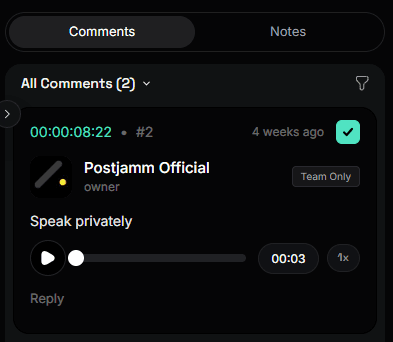
Resolve is what turns a wall of feedback into a checklist. It's also your record. Three months later, when a client insists they asked for something in round two, there is a timestamped, named, resolved comment history sitting in the project.
Version 2 — in the same project, on the same link
A new upload becomes a new version inside the same project. Same link. The client refreshes and sees the current cut.
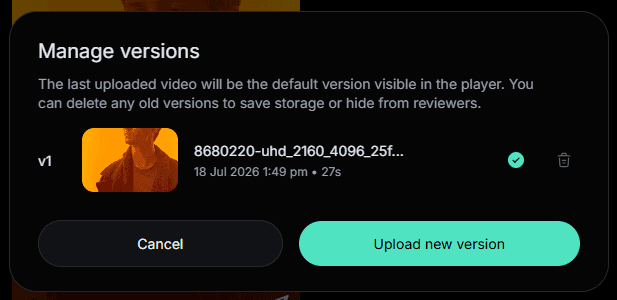
Previous versions lock. No new comments on superseded versions.
Go back and reread the Meera story. Every single thing that went wrong that Thursday is downstream of one fact: a stakeholder was watching v2 and giving notes on it during round four. Version locking isn't a nice-to-have. It's the fix.
Delivery
Final files release through delivery lock — the client gets the deliverable once payment is completed.
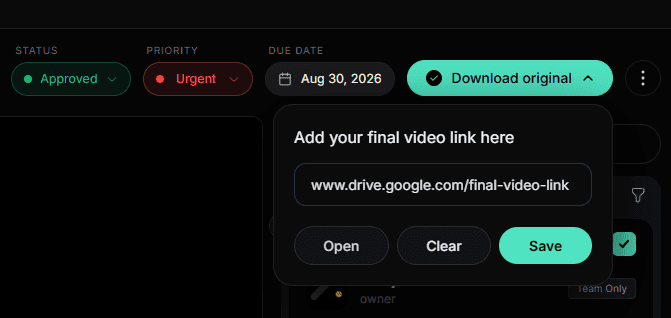
This is the step the entire category ignores, and it's the one that touches your bank account. Roughly a third of creative invoices are paid late, and in some creative sectors it's closer to half, with waits stretching toward 90 days. Handing over final files and then starting the chase is a choice. Postjamm makes the other choice the default.
What didn't happen
No WhatsApp thread
No screenshot with a red circle and no timestamp
No "which version was that on?"
No reconciling internal notes against client notes
No chasing the file and the invoice separately
Comparison at a glance
Postjamm | Frame.io | Filestage | Wipster | Drive + WhatsApp | |
|---|---|---|---|---|---|
Review without an account | Yes | Limited | Yes | Yes | Yes |
Internal vs client comments separated | Yes | Yes | Yes | Partial | No |
Built-in project management (priority, due date, stage) | Yes | No | Partial | No | No |
Voice note feedback | Yes | No | No | No | Sort of |
Social safe-area preview (IG / TikTok / Shorts) | Yes | No | No | No | No |
Old versions lock automatically | Yes | Partial | Partial | Partial | No |
Payment-gated final delivery | Yes | No | No | No | No |
Adobe NLE panel integration | No | Yes | No | Partial | No |
Camera-to-cloud ingest | No | Yes | No | No | No |
Pricing model | Per minute | Per seat + storage | Per seat | Per seat | Free |
Two rows there are losses. Frame.io's Premiere panel and camera-to-cloud are genuinely better, and if your workflow depends on either, that's a real reason to stay.
Who this is for — and who it isn't
Postjamm is a poor fit if: you're a large post facility on an Adobe enterprise agreement, your ingest depends on camera-to-cloud, or your editors work primarily through an NLE panel rather than a browser.
Postjamm is a strong fit if: you're a 2–20 person agency or studio, you run five or more client projects at once, most of your output is social and vertical, your clients are non-technical marketing managers, or you're currently paying for a review tool and a project management tool and duct-taping them together.
Frequently asked questions
What is the best video review software for client approvals?
The best tool is the one that covers your full approval loop rather than just the comment step. For agencies handling high revision volume with non-technical clients, Postjamm covers project setup, internal review, client review, version control, and paid delivery in one place. Frame.io remains the strongest choice for Adobe-centric post teams that need camera-to-cloud.
Do clients need an account to review a video in Postjamm?
No. Reviewers open the link, enter their name, and comment immediately. There's no signup, password, or app install.
Can I hide internal team notes from the client?
Yes. Internal comments are visible only to your team and sit on the same timeline as client feedback, so nothing has to be reconciled across two tools.
What happens to comments when I upload a new version?
The new version becomes the active one on the same link. Earlier versions lock, so clients can't add new comments to superseded cuts — which prevents the classic problem of receiving round-2 notes during round 4.
Can multiple stakeholders review the same video at once?
Yes. Every reviewer's comments land in the same project and are visible to everyone with access, so you get one consolidated list instead of five separate email threads.
Why per-minute pricing instead of storage-based pricing?
Because storage pricing penalizes you for the nature of video work. A single master can be several gigabytes. Per-minute pricing keeps costs predictable regardless of file size or codec.
Can I organize projects by client or campaign?
Yes. Folders, plus priority, due date, and stage on each project.
How do I make sure I get paid before handing over final files?
Delivery lock holds the final deliverable until payment is completed, so the file and the invoice resolve together rather than the invoice trailing weeks behind.
Back to Thursday
Same agency, same 45-second film, same round four.
The client opens the link on her phone in the back of a taxi. She scrubs to 00:14, draws a circle around the logo, and records an eight-second voice note. Her boss opens the same link, sees the current cut — not v2, because v2 is locked — and adds two comments of his own.
Meera's editor opens the project the next morning to a list of four items, resolves them one by one, and uploads v5 to the same link. The client refreshes. Approved.
The film ships Friday. The invoice clears before the files do.
Start your 14-day free trial → No card required.